Seating charts and reserved seating
General
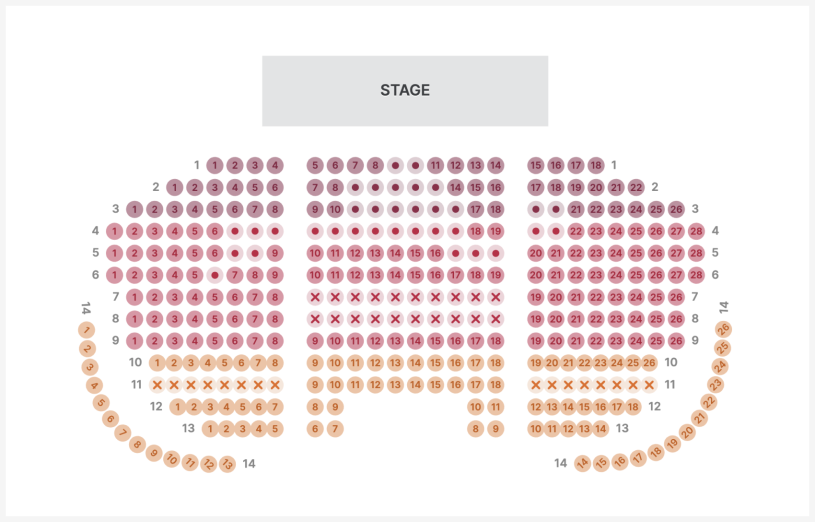
Fienta supports the following options for venues with reserved seating:
Traditional floor plans with chairs and rows.
Sectors and floors.
Table reservation as a whole table or by individual chairs.
General admission areas and booths.
Additional objects and text on the plan – for example, to mark the stage location, staircase positions, etc.
Option to display a photo to the buyer showing the view to the stage from the selected seat.
How to add a seating chart to your event
Enter your event draft on Fienta.
Send us your chart in any human-readable format (for example, an image, PDF, or XLS file).
We will add the plan to your event and notify you, after which you can publish the event. Please note that adding a seating plan may take a few days.
If your event has multiple dates, prepare the first event and let us add the seating plan to it. If you later create copies of the event for new dates, the seating plan will automatically be included.
Managing the seating plan
From the “Reserved seating” menu in the Fienta user interface, you can see an overview of sold seats and also make changes to the seating plan on the fly.
Overview
Here you can get a comprehensive overview of sold, reserved and available seats as well as seats that are removed from sale. Clicking on sold and reserved seats will show all seats related to the same order with a link to the order page.

If you need to change the seat on a ticket that has already been issued, please see the instructions for changing a ticket.
Categories
If you want to set different prices according to the location of the seats in the auditorium or designate special seats for invited guests, we can add various categories to your seating plan.
Each category can be associated with one or more ticket types, which can be set in the ticket type settings. You can modify the seats and rows corresponding to categories on the seating plan.

Statuses
Here you can remove entire rows or individual seats from sale. For example, you can leave space for a sound console or video equipment. If necessary, you can put these seats back on sale at any time.

If you want to reserve seats to sell them to someone later, use the special booking option instead of removing them from sale.
How much does it cost
An additional service fee is added per each sold or issued ticket. Please see our price list for more details.
Inserting seating charts by Fienta is free.