Add ticketing to your own site
Introduction
You can add the checkout process to your own website so it opens on top of your page content:
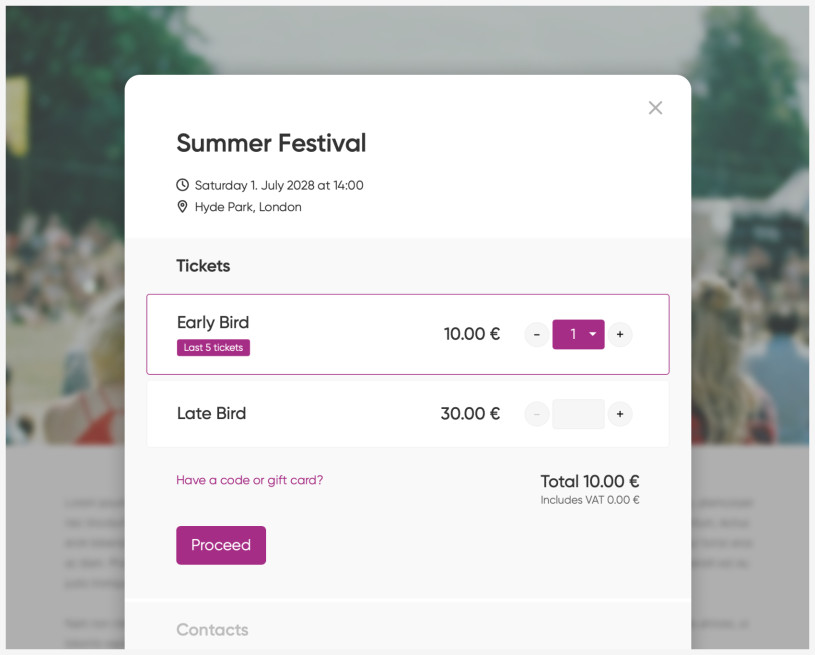
Basic setup
On your website, add a regular link to your event page on Fienta, for example:
<a href="https://fienta.com/event-name">Buy Tickets</a>Add the following line of code to your website. This will open links to Fienta events directly on your website:
<script src="https://fienta.com/embed.js"></script>
You can have multiple links on your website pointing to the same event or to different events on Fienta.
Include embed.js only once per page.
Tracking UTM parameters
If a visitor lands on your website with UTM parameters (for example ?utm_source=facebook) and the page includes Fienta's embed.js, the embed will automatically detect these parameters and pass them to Fienta. This allows you to see the source of your ticket sales in reports and the dashboard.
For more reliable tracking, we recommend adding the embed.js script to all pages on your site, not only the pages that contain ticket links or open the embed.
This is because users often navigate across multiple pages before purchasing, and UTM parameters may disappear from the URL during that journey. The embed script stores the UTM values in the browser when they are present and attaches them to the purchase later, ensuring accurate attribution even if the parameters are no longer visible in the URL.
Consent and tracking in embed mode
Fienta Embed respects the visitor's consent choices from your website. When available, the embed uses the IAB TCF consent signal. If TCF is not present, it can also read consent from common CMPs such as Cookiebot, CookieYes, and OneTrust.
If no supported consent signal is available, tracking stays in denied/default mode, so marketing and analytics events are not activated until consent is provided.
No extra custom integration code is required in typical setups. Just make sure your CMP is correctly configured and loaded on the page before embed.js.
Customisation
To change the embed's background colour, border radius, and other parameters, define a JavaScript object as shown in the following example. The values shown here are the defaults.
<script>
window.fientaSettings = {
    // lightbox background color
    background: 'rgba(0,0,0,0.5)',
    // modal content border radius
    border_radius: '5px',
    // selector of links pointing to Fienta event pages
    link_selector: 'a[href*="fienta.com"]',
    // referral name
    utm_source: 'homepage',
};
</script>
<script src="https://fienta.com/embed.js"></script>
When implementing, leave only parameters you wish to modify.
Displaying event description and image
By default, the embed does not include the event description. You can enable it by defining the following line in window.fientaSettings:
descriptionEnabled: true,To show the description as the initial view, add:
step: 'description',To display the event image:
imageEnabled: true,To pass the buyer's email address:
email: '[email protected]',Preselecting a specific ticket
If you have multiple ticket types, the selection opens with none of them selected. You can make Fienta preselect a specific ticket type by adding the ticket parameter to the URL. For example:
<a href="https://fienta.com/event-name?ticket=1234">Buy Tickets</a>You can find the ticket type ID in the browser address bar when editing it, for example, https://fienta.com/my/ticket_types/1234/edit
Choosing which links open in the embed
By default, embed.js opens matching Fienta links in the checkout lightbox. If your page contains other links to Fienta, for example help pages, organiser pages, blog posts, or footer links, you may want to limit the embed to only your ticket buttons.
Add a custom class to the links that should open the checkout:
<a class="fienta-embed" href="https://fienta.com/event-name">Buy Tickets</a>Then configure link_selector before loading embed.js:
<script>
window.fientaSettings = {
    link_selector: 'a.fienta-embed'
};
</script>
<script src="https://fienta.com/embed.js"></script>
Displaying "Sold out" and the number of tickets available
On each page load and after each ticket purchase, an onTicketsAvailableReady event is triggered. Use this to display the number of tickets left or to modify your HTML, for example by disabling the link when sales have ended.
<script>
window.fientaSettings = {
 onTicketsAvailableReady: function(elem, count) {
 // elem - HTML a tag pointing to event at fienta.com
 // count - number of tickets available, possible values:
 // true - when more than 50 tickets are available
 // 1 .. 50 - number tickets available
 // 0 - event is sold out
 // false - sale has ended

// write your code here
 }
}
</script>
<script src="https://fienta.com/embed.js"></script>
Full code example
<script>
window.fientaSettings = {
 background: 'rgba(255,0,0,0.5)',
 border_radius: '0',
 onTicketsAvailableReady: function(elem, count) {
 if (count === true) {
 // more than 50 tickets are available
 }
 else if (count > 0) {
 elem.text('Only ' + count + ' tickets left');
 }
 else if (count === 0) {
 elem.addClass('disabled').removeAttr('href').text('Sold out');
 }
 else if (count === false) {
 elem.addClass('disabled').removeAttr('href').text('Sale has ended');
 }
 }
}
</script>
<script src="https://fienta.com/embed.js"></script>
Opening the embed from a URL
You can share a link to your website that opens the embed automatically:
https://your-website.com/page?openEmbed=https://fienta.com/event-name